

The video above is my SocialBu and Claude tutorial, the system I used to take a brand-new Instagram account to 1.1M views in 30 days with zero paid ads.
👇 The written version is below, setup steps and prices included. Let’s dive in.
I’ve hired agencies and individuals for social media (they were all great in their own way), but I know my own business best, and I want to batch it all at the start of the week and not touch it.
Here’s the thing: if people don’t know about your books or your Substack, they can’t buy any of it.
And I skip paid ads at the moment in most platforms, because I don’t want my business riding on the black box of whether an ad performs.
🧰 The stack, and what it costs
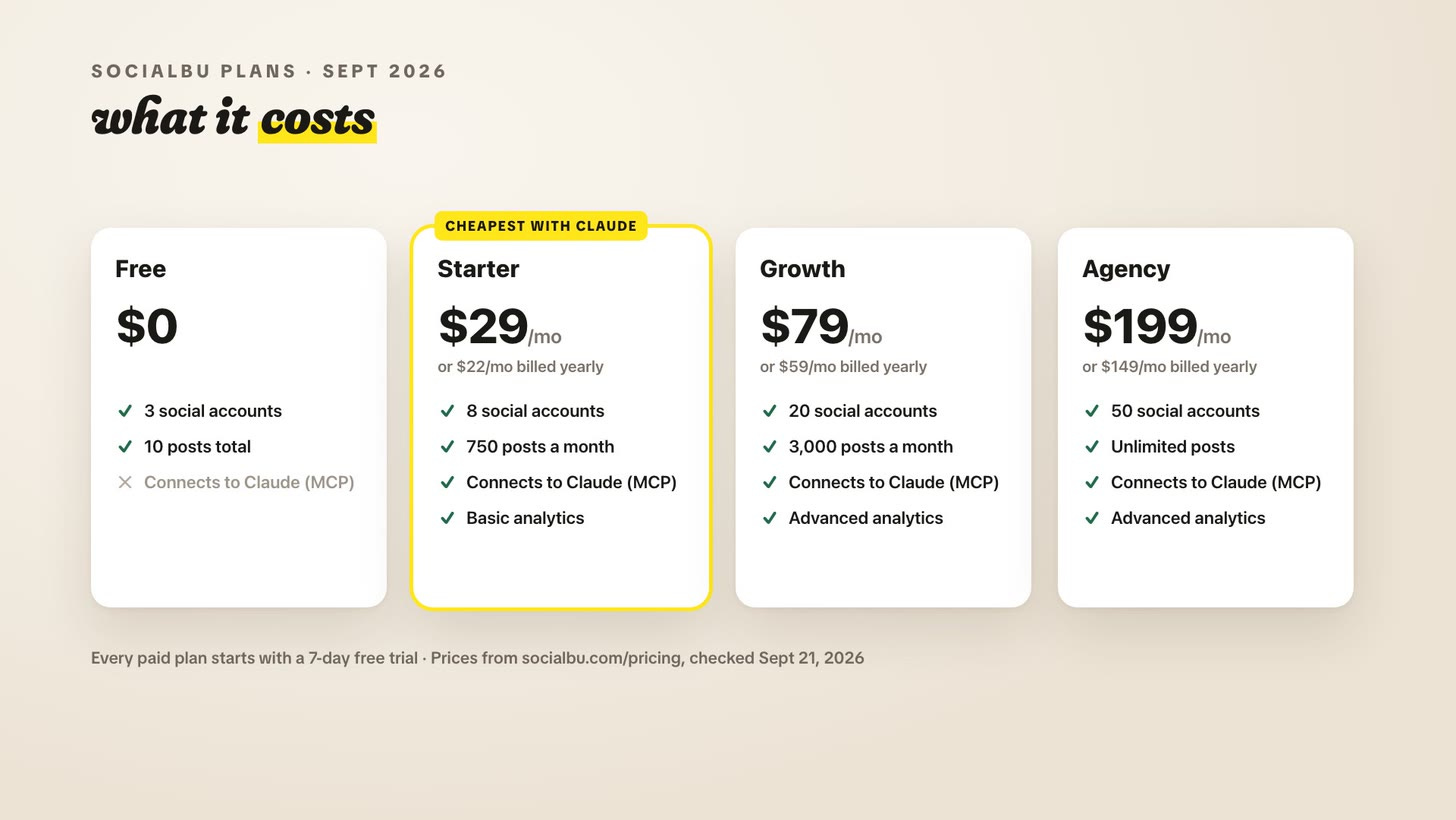
SocialBu schedules your posts and plugs into Claude through a connector (the techy name is MCP) that comes with every paid plan. Starter is $29 a month, or $22 a month billed yearly, with a 7-day free trial.
Claude Pro is $20 a month, or $17 a month billed yearly.
Together, that’s $49 a month, or $39 a month billed yearly, as of September 2026. Think of it as a social media intern you don’t have to pay (other than the subscription fees). It does the copy-pasting and trims each post to fit every platform’s character limit.
🔌 How do I connect SocialBu to Claude?
1. Create a SocialBu account on a paid plan (the free plan can’t connect to Claude) and connect your social accounts.
2. Upgrade to Claude Pro.
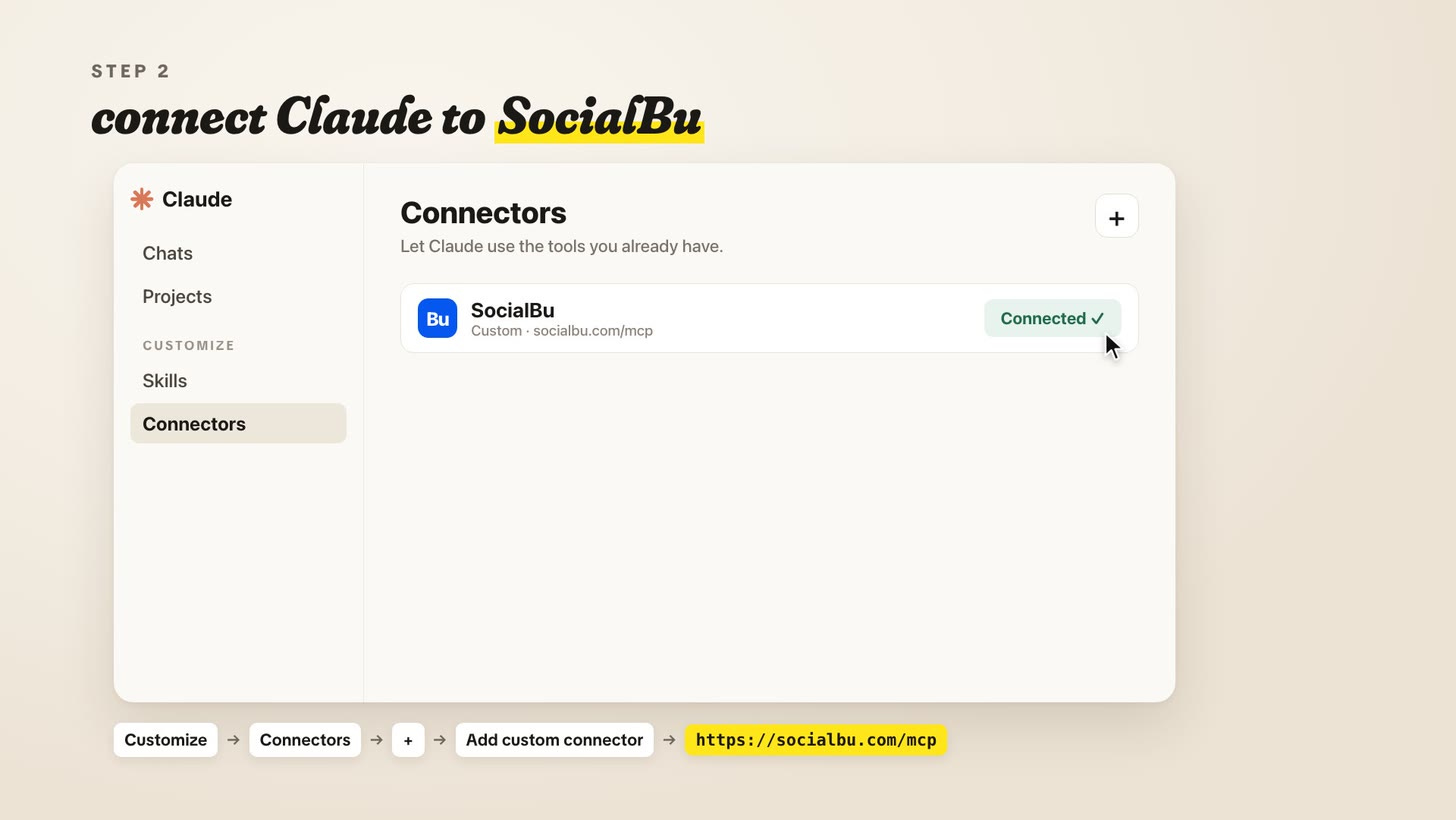
3. In Claude, open Customize, then Connectors. Click +, choose Add custom connector, name it SocialBu, and paste in https://socialbu.com/mcp
4. Click Add, then Connect, and authorize your SocialBu account.
5. In any chat, turn SocialBu on from the + menu (bottom left) under Connectors.
6. Create a Claude project and fill it with your material (your book, your Substack posts, your drafts), as much as you’re comfortable sharing.
☕ My Sunday Social Media Hour
On Sunday I give Claude the Substack post going out that week, plus any drafts or ideas, and ask it to write and schedule posts for LinkedIn, X, Threads, and Instagram for after the post goes live, with the link in the first comment. (On LinkedIn, never put a link in the body of a post.) Other schedulers make you add that comment by hand. Claude just does it. Prefer writing your own posts? Drop them in a doc for Claude to schedule.
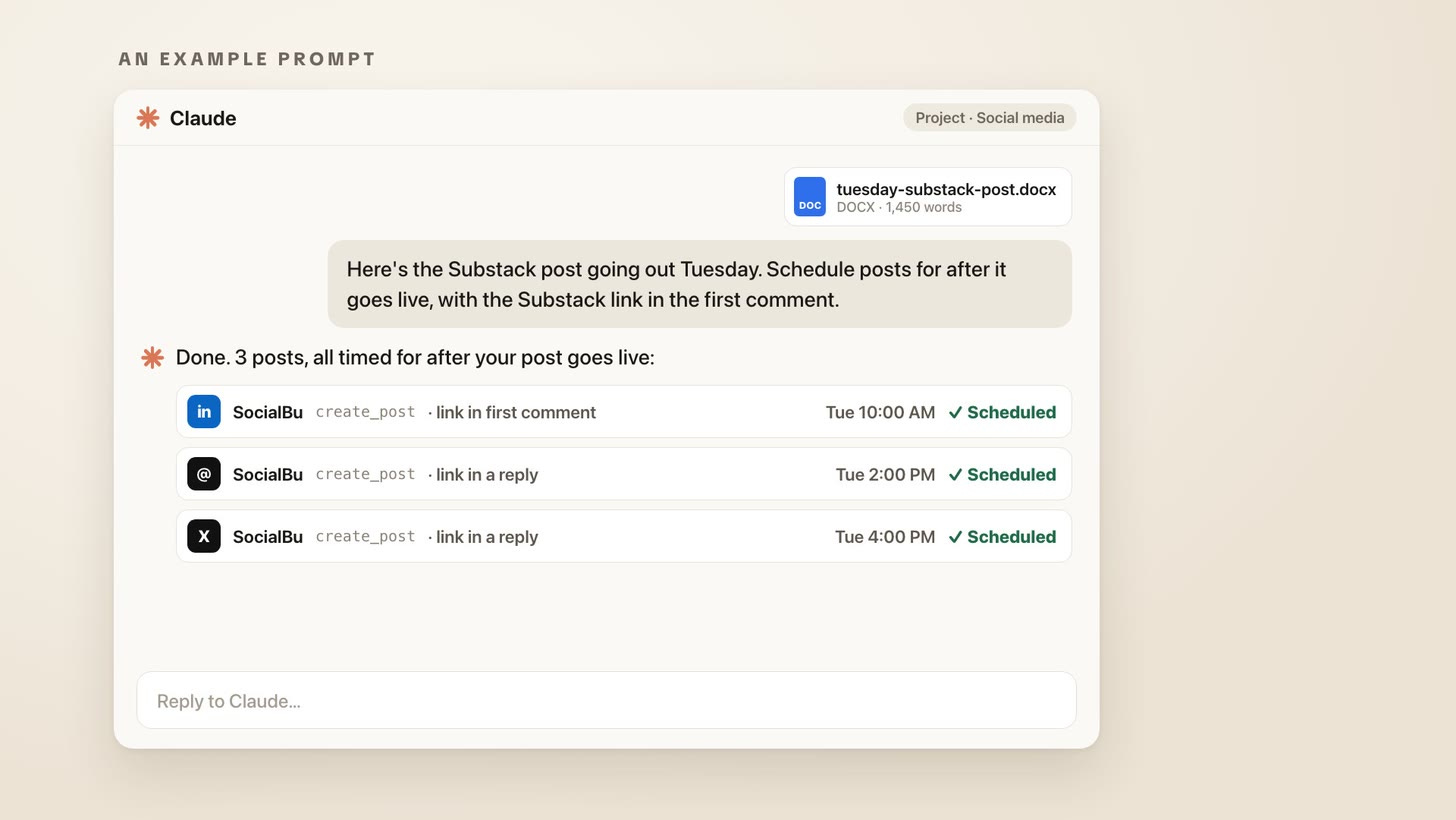
Then I check SocialBu’s scheduled tab. If I don’t like a post’s wording, I screenshot it, give Claude the screenshot with my changes, and it fixes the post in the queue.
That’s an hour, maybe less, for a week of written posts. SocialBu also tracks what performs, down to the time of day on each platform (Threads is especially picky about timing). When we first started using SocialBu for Make Writing Your Job, we saw an increase of over 200,000 views on Threads within the first 30 days.
🎥 Next Up: Video
Video makes a lot of us writers a little anxious. During a book launch, you want your head in the podcasts you’re guesting on and the launch party — not in what to say in today’s TikTok about preorders.
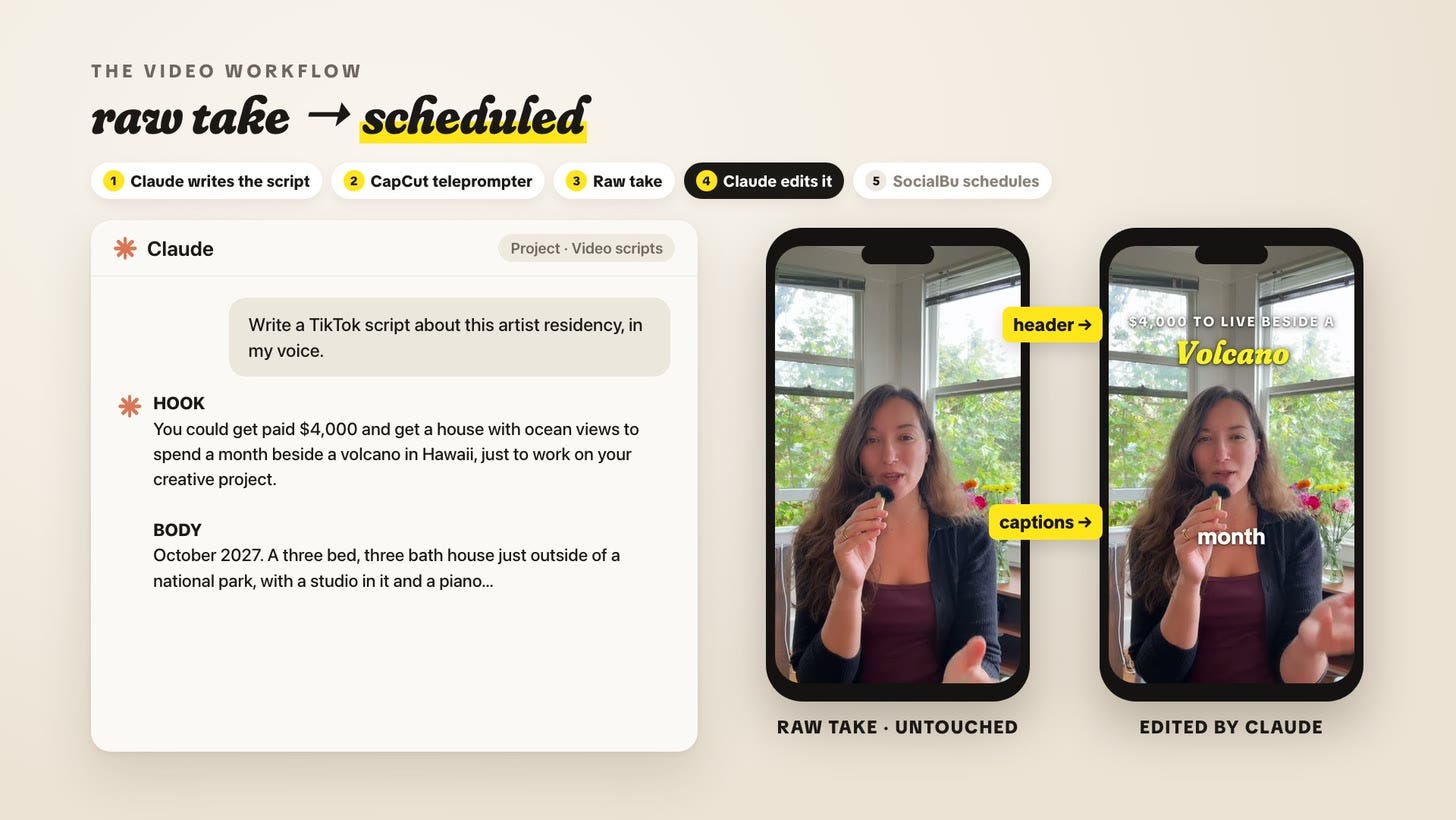
So let Claude write your TikTok scripts in your voice (or write your own), and read them off the teleprompter in CapCut. Hand Claude the raw file, untouched, and ask it to edit in captions and a header. Then Claude hands it to SocialBu to schedule, and the analytics show which time of day and even which fonts perform best.
📈 What 30 days looked like
My Instagram dashboard for the brand-new account, August 22 to September 20:
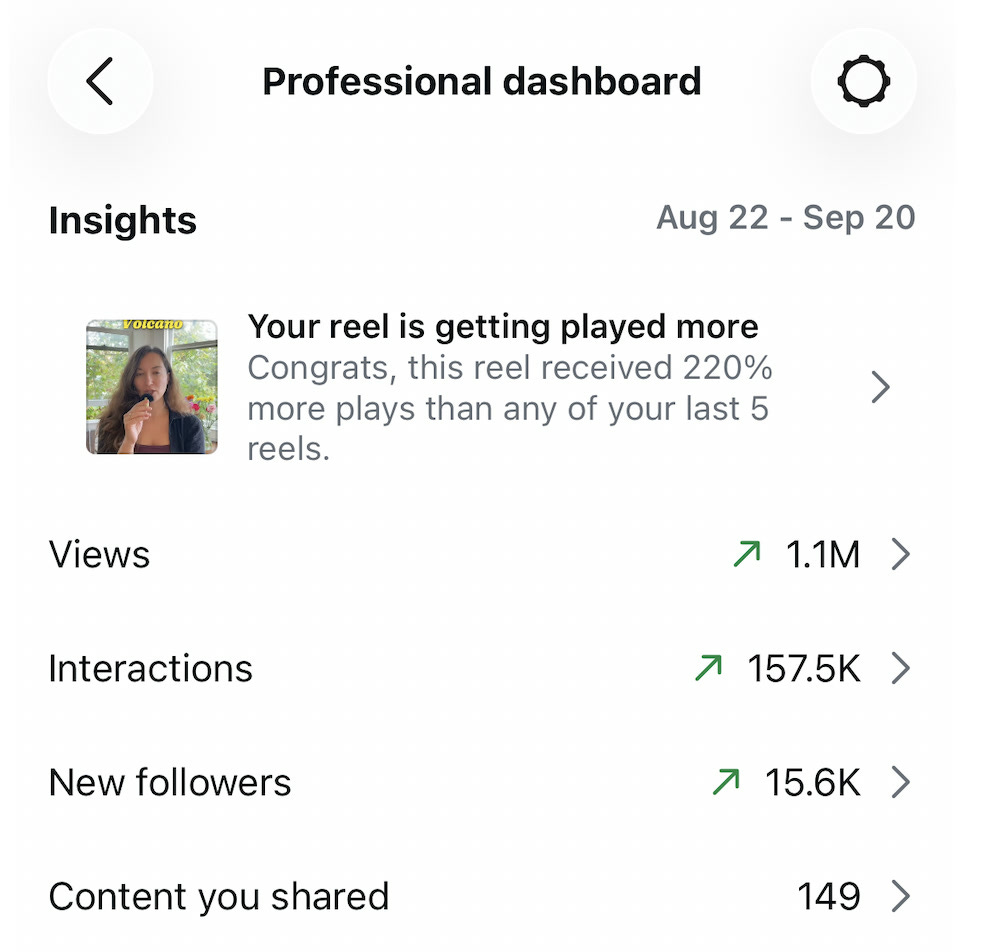
1.1M views
157.5K interactions
15.6K new followers
One reel got 220% more plays than any of my last 5 reels. I spent $0 on ads — and very little time, relative to what it produced.
🎓 I’m teaching a workshop on this
There’s more nuance than I could fit in one video, so I’m teaching an upcoming workshop that goes deeper into:
Creating viral videos with AI
A content system that takes the busywork off your plate
Getting the most views for the least amount of work
Instagram trial reels, which drove ~ massive ~ amounts of traffic for me
Hidden features I’m excited to share
If you’re interested in the longer workshop, feel free to fill out the form below:
Either way, hand Claude the busywork this Sunday and spend the rest of your week on the creative work only you can do. I’m rooting for you.
See you around my creative lab this week,
-Amy
p.s. know a writer who would rather be writing than posting? feel free to share this with them!


